


- By Admin
-
 Listing Optimization
-
 12 November, 2026
Your listing gets 1,000 visits a week. Last month it got 40 orders. This month it still gets 1,000 visits, but only 28 orders. You did not change the ads. You did not change the price. So where did the orders go?
This is a low Amazon conversion rate problem. More traffic will not fix it. You need to find which part of the page loses the buyer. This guide shows you how to check, in what order, and when to leave the listing alone.
Key takeaways
- Amazon conversion rate is the share of visits that end in an order. Always read it together with sessions (visits).
- Falling sessions and falling conversion are two different problems. They need two different fixes.
- Fix the page before you raise ad spend. A weak page makes every ad rupee work less.
- Change one thing at a time. Wait one to two weeks. Then compare.
What is Amazon conversion rate?
Amazon conversion rate shows how many shoppers buy after they open your product page. In Seller Central Business Reports, the closest metric is usually called "Unit Session Percentage". Check the exact name and definition in your own account. Amazon can change report names.
Two terms to know:
- Session: one visit to your product page. Amazon counts repeat visits from the same shopper within a short window as one session, so it is not the same as page views.
- Conversion rate: units ordered ÷ sessions × 100.
Example: 40 orders from 1,000 sessions is a 4% conversion rate.
Amazon does not publish one "good" conversion rate for all sellers. A phone cover and a mattress behave very differently. So do not copy a number from a blog. Compare each product with its own past weeks.
You can find the data in Seller Central under Reports > Business Reports > Detail Page Sales and Traffic (by ASIN). An ASIN is the unique product ID that Amazon gives each product.
Is it a traffic problem or a conversion problem?
Start here. This one step saves hours of guessing.
Open the by-ASIN report. Compare the last 14 days with the 14 days before. Look at sessions and conversion rate side by side.
| What you see | What it likely means | Check first |
| Sessions down, conversion steady | Fewer shoppers find you | Ads, keywords, stock |
| Sessions steady, conversion down | The page loses buyers | Price, images, reviews |
| Both down | Several causes at once | Stock and Buy Box first |
| Sessions up, conversion down | New traffic is less ready to buy | Search terms, ad targeting |
Amazon's own Seller Central India forum guide for falling sales gives the same simple split. Low sessions point to traffic. Steady sessions with lower conversion point to the listing or price. It also asks sellers to check the Featured Offer percentage if sales fall.
Note: this is a forum guide, not a formal policy page. Use it as a method, not as a rule.
Why do shoppers visit but not buy?
Most low-conversion pages have one or two of these causes. Check them in this order.
1. Is your price still competitive?
Shoppers compare prices in seconds. A rival drops the price by 10%, and your page now looks expensive. Check the top 3 rivals for your main keyword. Also check delivery promise and offers.
Read our guide on tracking competitor price and stock changes to build a simple weekly routine.
2. Do you still hold the Buy Box?
The Buy Box is the "Add to cart" box on the product page. If another seller holds it, your visits do not turn into your orders. Check your Featured Offer percentage in the same report. Our guide on the Buy Box and ad spend explains what to do.
3. Is stock low or is delivery slow?
A product that is out of stock, or shows a long delivery date, loses orders. Check stock before you change anything else.
4. Did reviews or ratings change?
One new batch of bad reviews can lower conversion fast. Read the latest 20 reviews. Look for repeated words such as "size", "broken" or "not as shown". Our guide on turning review complaints into fixes shows how to group them.
5. Do the title and images answer the buyer's question?
Open your page on a phone. Ask: in 5 seconds, can a stranger tell what this is, who it is for and why it is better? Check the main image, the first bullet and the size or pack details. Our guide on Amazon title and item highlights covers title rules. Check the current rules in Seller Central before you edit.
6. Is the traffic the wrong traffic?
If you raised ad spend or ran a sale, you may attract shoppers who are less ready to buy. Check the search term report in the Ads console. Add negative keywords for terms with many clicks and no orders.
Worked example: why a small change in conversion matters (illustrative)
These numbers are illustrative. They are not Amazon fees or real results.
A product sells at ₹800. Profit before ads is ₹280 per unit. The average cost per click (CPC) is ₹12.
Formula: ad cost per order = CPC ÷ conversion rate
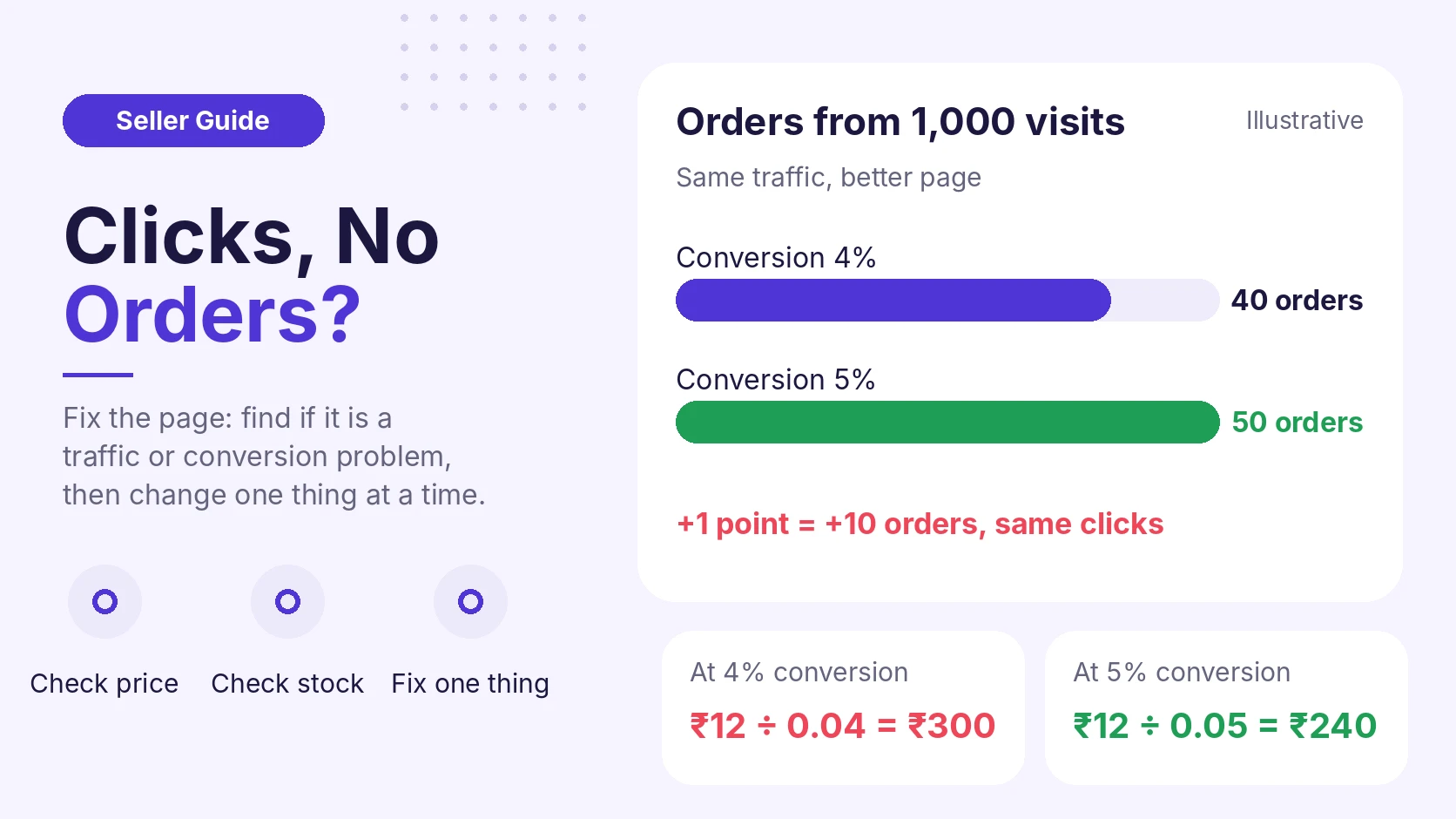
- At 4% conversion: ₹12 ÷ 0.04 = ₹300 per order. Profit after ads: ₹280 − ₹300 = −₹20 per order.
- At 5% conversion: ₹12 ÷ 0.05 = ₹240 per order. Profit after ads: ₹280 − ₹240 = +₹40 per order.
The example assumes ad clicks convert at the same rate as all visits. In real accounts they can differ.
Now look at 1,000 visits:
- At 4%: 40 orders = ₹32,000 sales.
- At 5%: 50 orders = ₹40,000 sales.
One percentage point turned a small loss into a small profit. It also added 10 orders. You did not buy one extra click.
A 7-step checklist to raise conversion
Use this on your top 3 products first. It takes about an hour.
- Pull the numbers. Download sessions and conversion rate by ASIN for the last 14 days and the 14 days before.
- Label the problem. Use the table above: traffic, conversion, or both.
- Check stock and Buy Box. Fix these before anything else.
- Check price. Compare with the top 3 rivals for your main keyword.
- Read the last 20 reviews. Write down repeated complaints.
- Review the page on a phone. Check the main image, first bullet and title.
- Change one thing. Note the date. Wait one to two weeks. Compare conversion again.
When should you not change the listing?
- Sessions are very low. With 50 visits, one extra order moves conversion by 2 points. The data is too small to trust. Wait for more visits.
- Sales just ended. Conversion often drops after a sale because the deal is gone. Give it a few days. Our guide on resetting ads after a festive sale covers this period.
- Conversion is very high but sessions are tiny. The listing may be fine. You may need more traffic, not edits.
- You are about to change many things at once. You will not know which change worked.
How eComSuite helps
eComSuite does not replace your judgement. It saves time on the checks above. These modules match the steps in this guide:
- Sales Analytics: view product and ASIN performance, and spot revenue-impacting issues earlier.
- Listing Optimization: work on titles, descriptions, images and keywords for your listings.
- Customer Sentiment Analysis: turn review text into clear themes.
- Ads Optimiser: use negative keywords to cut wasted spend from clicks that do not buy.
Takeaway
A low conversion rate is a signal, not a verdict. First decide if you have a traffic problem or a conversion problem. Then check price, Buy Box, stock, reviews and the page, in that order. Make one change at a time.
Want to see sessions, conversion and ad waste in one place? Sign Up - Free.
Sign Up - Free
FAQ
What is a good conversion rate on Amazon?
There is no single number. It depends on category, price and season. Compare each product with its own history and with similar products you sell.
Why did my conversion rate drop suddenly?
Check price, Buy Box, stock and new reviews first. Then check whether a sale or ad change brought less-ready shoppers.
How long should I wait after a listing change?
Wait one to two weeks, or until you have enough visits to compare. Keep notes with dates.
Where do I find conversion data in Seller Central?
Open Reports > Business Reports > Detail Page Sales and Traffic. Pick the by-ASIN view. Check the metric names in your account.