


- By Admin
-
 Advertising
-
 18 September, 2026
Your best-selling SKU has run the same Sponsored Products campaign for months.
Spend is steady. Clicks are steady. Then, on a Thursday, conversion quietly collapses-not to zero, but close enough that you notice. ACoS climbs. You check the usual suspects: has a competitor entered the keyword auction, did the listing change, did a review come in.
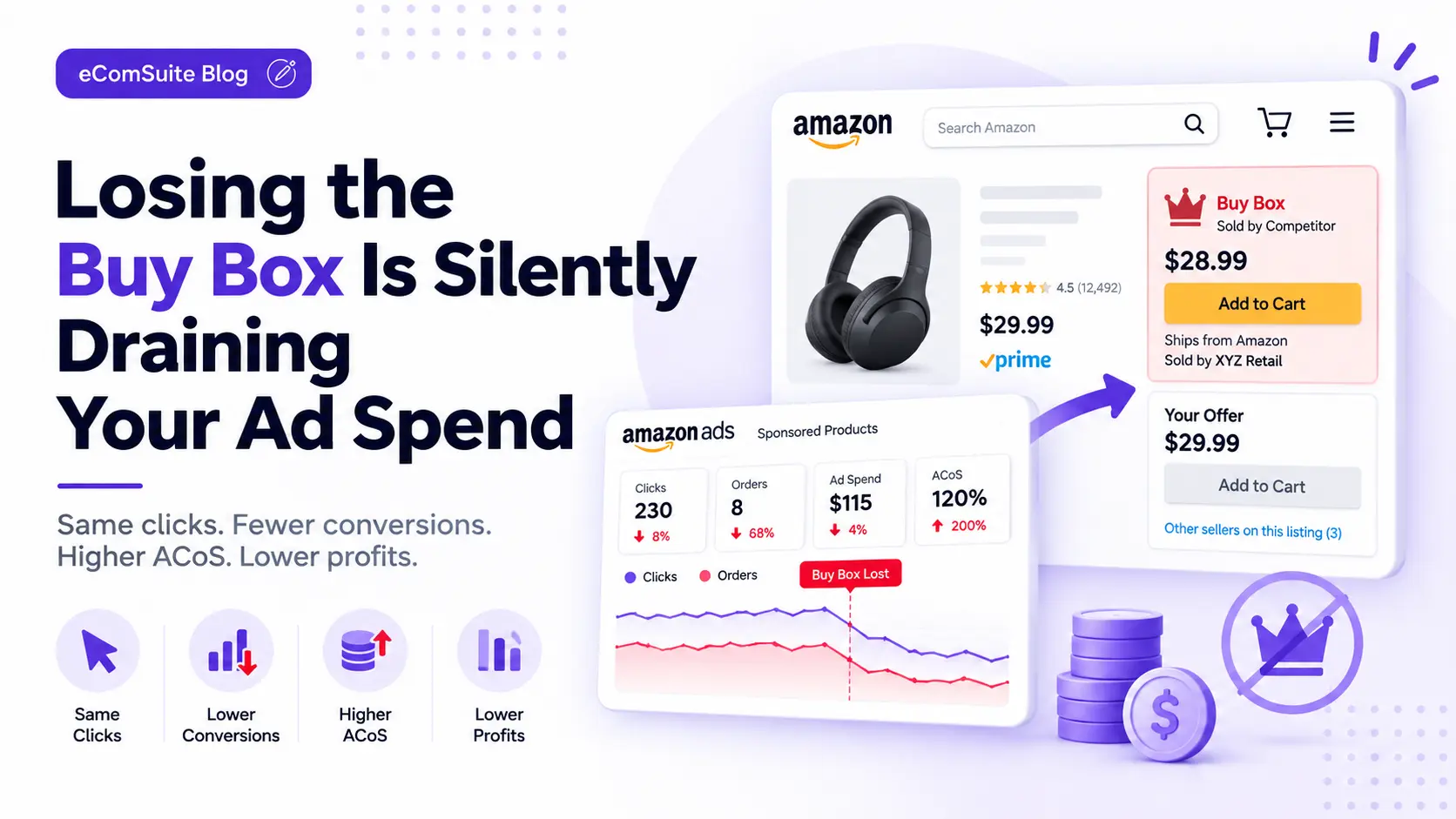
None of that happened. What actually happened is a reseller listed the same ASIN four rupees cheaper on Wednesday night and took the Buy Box. Your ad kept running, kept winning the keyword auction, kept generating clicks-onto a listing where the "Add to Cart" button no longer put your offer in the cart.
Nothing in your ad dashboard said so. ACoS just looked worse, on a day that looked, by every metric your ad reports actually show you, like any other day.
You can have the right keywords, competitive bids, a healthy budget and strong campaigns, and still waste advertising money this way. The reason is one that gets treated as a separate, purely pricing problem when it should be treated as part of your advertising strategy: you are not consistently winning the Buy Box.
What Is the Amazon Buy Box?
The Buy Box is the prominent purchasing option Amazon displays on a product detail page. When multiple sellers offer the same product, Amazon determines which seller's offer gets that primary purchase position.
Several factors can influence Buy Box eligibility and ownership, including:
- Competitive pricing
- Fulfillment method and delivery performance
- Product availability
- Seller performance and account health
- Order defect and cancellation rates
- Shipping reliability
You may have a product that ranks well organically and receives strong advertising traffic, but if your offer frequently loses the Buy Box, your ability to convert that traffic is affected regardless of how well the campaign itself is built.
What Losing the Buy Box Actually Does to Your Ads
When more than one seller has an offer on the same ASIN, only one of them holds the Buy Box at any given moment-the offer that's actually added to the cart when a shopper clicks the main buy button. Amazon decides who holds it using the factors above, and it can change hands multiple times a day.
Amazon's advertising policy is explicit that Sponsored Products ads are meant to stop serving once your offer isn't Buy Box eligible-a click on your ad shouldn't be able to land on a listing you can't fulfil from. That's the rule.
In practice, the two systems don't move in lockstep. Buy Box eligibility and ad delivery are checked on different clocks, and the handoff between them isn't instant. For a window that can run from minutes to hours, an ad can keep serving after the Buy Box has already moved, sending clicks to a listing where a shopper either can't buy from you at all or has to actively choose "other sellers on this listing" to do it-a step most shoppers never take.
This creates a chain that's easy to miss until it's already cost you money:
Buy Box loss → Lower offer visibility and conversion → Fewer attributed orders → Higher ACoS → Lower ROAS → Reduced profitability.
A Campaign Can Have Good Traffic but Poor Business Results
One of the most costly mistakes is judging a campaign only by impressions, clicks, CPC and spend-the metrics your ad dashboard actually shows.
| Metric | Before Buy Box Loss | During Buy Box Loss |
| Impressions | 10,000 | 10,000 |
| Clicks | 250 | 230 |
| Ad Spend | ₹12,000 | ₹11,500 |
| Orders | 25 | 8 |
| Sales | ₹30,000 | ₹9,600 |
| ROAS | 2.5 | 0.83 |
| ACoS | 40% | 120% |
The campaign didn't necessarily become less relevant overnight. The underlying marketplace conditions changed. That's why a sudden jump in ACoS shouldn't automatically lead to raising bids, changing keywords or adding budget-the first question should be whether you're still winning the Buy Box.
Why It's So Hard to Spot
If your ad dashboard showed a Buy Box column next to ACoS, this would be a non-issue. It doesn't, and that's the whole problem.
Buy Box percentage lives in a completely different report-Business Reports, not the advertising console-on its own cadence, checked by almost nobody on a daily basis and cross-referenced with ad spend by even fewer people. Your ad reports show spend, clicks and conversions. None of those fields tell you whether the click had any chance of becoming a sale in the first place.
A few hours of lost Buy Box, on a SKU that isn't your only one running that day, blends into the daily average. ACoS looks "a bit worse than usual" instead of "broken for six hours"-and "a bit worse than usual" doesn't trigger anyone to go digging.
Why Sellers Lose the Buy Box (and What to Do About It)
1. Price Competition
Price is one of the most obvious reasons. If another seller offers the same product at a more competitive price, Amazon may favour that offer-even a relatively small difference can matter when customers have multiple offers available.
Constantly lowering your price isn't always the right response, though. A lower price may help Buy Box performance while simultaneously reducing your product margin, so the decision should weigh Buy Box share, conversion rate, advertising cost and product margin together, not price alone.
Fix: Know your true SKU-level margin before you decide whether to match. eComSuite's SKU Unit Economics consolidates sales, fees, ad spend and logistics costs per SKU, so you know whether a matched price still leaves you a margin before you commit to it. Matching a price you can't actually afford just moves the loss from wasted ad spend to an unprofitable sale.
2. Inventory Fluctuations
Inventory availability directly affects your ability to convert demand. A product that normally sells well but frequently approaches low inventory levels creates a dangerous situation: advertising keeps generating demand while inventory availability becomes the bottleneck, and Buy Box eligibility can weaken before the listing shows fully out of stock.
Fix: Tie ad pacing to inventory runway rather than to the in-stock flag alone. Throttling spend as days of supply approaches a floor-using Inventory Forecasting and the Inventory Dashboard to coordinate that with inventory-aware advertising more broadly-catches the risk before the Buy Box actually moves, not after.
3. Account and Seller Performance
Buy Box performance isn't only about price. Seller performance and fulfilment-related factors also influence offer competitiveness. Issues such as poor delivery performance, cancellations or account health problems can have consequences well beyond seller metrics-they can affect your ability to turn advertising traffic into profitable orders.
Fix: Treat account health monitoring as part of your advertising hygiene, not a separate compliance chore. A slipping performance metric is worth checking the same way you'd check a price change, since both move the Buy Box the same way.
Before You Increase Bids, Check the Fundamentals
If a keyword's conversion rate drops, the instinctive read is that the keyword got weaker-so bidding rules, automated or manual, often respond by pulling back on it or raising the bid to recover volume. Either reaction is a reasonable response to a keyword problem.
Buy Box loss isn't a keyword problem. It's an offer-eligibility problem wearing a keyword problem's clothes, and treating it like one makes things worse in both directions: pulling back starves a keyword that was actually fine the moment the Buy Box comes back, and raising the bid pours more spend behind clicks that still can't convert until the underlying offer issue is fixed. This is the same trap automation without the right signal tends to fall into-it optimizes hard against the number it can see, which isn't always the number that explains what's happening.
Before increasing spend, check the fundamentals:
- Are we still winning the Buy Box?
- Has our Buy Box percentage changed recently?
- Did our selling price change?
- Are competitors pricing more aggressively?
- Are we experiencing inventory fluctuations?
- Has our account or fulfilment performance changed?
- Did conversion rate fall at the same time as Buy Box share?
And once the Buy Box does return, that keyword's recent history still shows the bad stretch, quietly dragging down any rolling average or automated rule that looks back over the last several days-a distortion in the same family as attribution lag: the dashboard is accurate and incomplete about what actually happened, and nothing marks the difference.
How to Tell You're Losing Buy Box Coverage
- Look at clicks-to-cart, not just clicks-to-sale. A click that never reaches "Add to Cart" points at an eligibility problem before it points at a demand problem-it rules out the listing or price as the cause and points straight at the offer.
- Track your own price against the listing, not just your own price history. Buy Box is relative to what other sellers on the same ASIN are doing, so your price can be unchanged and still lose you the Buy Box if someone else's moved.
- Watch for ACoS spikes on one SKU that don't fit a pattern you already know, such as a peak-hour dip or a fresh campaign still settling. An unexplained, SKU-specific spike is worth a Buy Box check before it's written off as normal noise.
Turn this into a weekly habit rather than a reaction. Once a week, compare these for your important ASINs:
| Metric | What to Look For |
| Buy Box % | Is it stable or declining? |
| Selling Price | Did your price change? |
| Competitor Price | Are competitors becoming more aggressive? |
| Conversion Rate | Did conversion fall? |
| ACoS / ROAS | Is advertising becoming less efficient? |
| Inventory | Are stock levels becoming risky? |
Pay particular attention when several of these move together. Buy Box down, conversion down and ACoS up at the same time is a far stronger warning than any one of those metrics moving alone.
Build a Buy Box-Aware Advertising Strategy
The goal isn't to pause advertising the moment Buy Box share dips. It's to use Buy Box performance as a decision signal alongside your ad metrics.
Healthy Buy Box Performance
If Buy Box share is stable and conversion is healthy, continue normal optimization: bid tuning, keyword and search-term review, placement performance and budget allocation.
Declining Buy Box Performance
If Buy Box share starts declining, investigate before increasing spend-work through the fundamentals checklist above rather than reaching for a bid change.
Severe Buy Box Loss
If Buy Box ownership drops sharply and conversion falls with it, consider reducing inefficient ad exposure until the underlying issue is addressed. The exact action depends on your margins, product category, campaign objectives and marketplace conditions.
The Uncomfortable Part
Pausing ads the moment you spot a price dip isn't free either.
Buy Box changes hands constantly, and a lot of drops resolve themselves within hours-a competitor's stock runs out, a price war settles, a metric recovers. Pausing and resuming a campaign every time the Buy Box flickers can cost you the campaign's learning and relevancy history for a problem that was already fixing itself.
So the judgment call isn't "pause on any Buy Box dip." It's telling apart a structural loss-a competitor systematically priced below you, or stock genuinely thinning-from a blip that resolves on its own. Structural losses are worth acting on immediately. Blips are usually worth riding out.
The Broader Lesson
Advertising and Buy Box eligibility are managed by two separate systems inside Amazon-one tracking pricing, fulfilment and account health, the other tracking keyword auctions and campaign delivery-and neither one tells the other what it's doing.
Nothing in your ad dashboard will ever say "this click could not have converted." Connecting pricing, fulfilment and account-health signals to advertising decisions is on the seller, because Amazon's own reporting doesn't do it for you.
How eComSuite Handles This
The fix isn't a single alert-it's bringing advertising metrics, Buy Box signals and inventory data into one view instead of three separate reports. A few things in the platform are already built for pieces of that.
- Ad Pulse gives near real-time, hourly visibility into campaign performance, so a conversion collapse shows up as an hour that broke from the pattern, not as a slightly worse daily average buried at the end of the day.
- Budget Alerts notify you at 85% and 100% of daily spend, giving you a checkpoint to ask whether a SKU is still worth funding before the full day's budget is gone.
- Inventory Dashboard and Inventory Forecasting flag low stock and shrinking runway before a listing goes fully out of stock-the same early window in which Buy Box eligibility is most at risk.
- SKU Unit Economics consolidates sales, fees, ad spend and logistics costs per SKU, so if matching a competitor's price is what it takes to win back the Buy Box, you know whether that price still leaves you a margin before you commit to it.
Losing the Buy Box isn't just a marketplace problem. It can become an advertising profitability problem. The smartest Amazon sellers don't ask only "how can I get more clicks?" They also ask:
"If I pay for this click, am I in a position to win the sale?"
Want a clearer, hourly view of where your ad spend is actually going? eComSuite's Ad Pulse shows you campaign performance as it happens, not a day late.
Book a Demo