


- By Admin
-
 Advertising
-
 05 November, 2026
The festive sale ended last night. Your orders were strong for a week. This morning, orders are lower, but your ads still spend at sale speed. By Friday, the ad report shows a high ACoS and a smaller profit.
This is common with Amazon ads after festive sale week. This guide shows what to check in the first three days, and how to bring bids and budgets back to normal without losing the sales you still want.
Key takeaways
- Sale-week bids and budgets are made for sale-week demand. Review them within 3 days after the sale.
- Compare your ACoS with your break-even ACoS. Do not judge only by sales.
- Reduce budgets and bids in small steps (for example 20% to 30%), not to zero.
- Keep a written list of every sale-week change, so you can undo each one.
Why do Amazon ads cost more after a festive sale?
Your ad settings stay the same until you change them. Many sellers raise budgets and bids for the sale. After the sale, shoppers have often bought what they needed, and demand can fall. The same settings now buy fewer sales.
Three things usually happen:
- Fewer shoppers search for your product, so the same spend gives fewer orders.
- Sale prices, coupons or deals end, so the page converts less well.
- Rules you set for the sale keep running if nobody turns them off.
This does not happen to every product. A fast-moving product may keep strong demand. So look at your own numbers first. Do not copy a fixed percentage from a blog.
Two terms used in this guide:
- ACoS (advertising cost of sales): ad spend divided by ad sales.
- Break-even ACoS: the highest ACoS at which an ad sale still does not lose money. Formula: profit per unit before ads ÷ selling price.
What to check in your Amazon ads after festive sale ends
Do these checks in the first three days. They take about 45 minutes.
- Find your sale-week changes. List every campaign where you raised a bid or a budget. If you use budget rules, open each rule and check its date range in the Ads console.
- Compare ACoS by campaign. Use the last 3 days, not the sale week. Mark campaigns above break-even ACoS.
- Look at hours. Spend that ran late at night during the sale may now bring no orders.
- Check stock. If sale stock is low, slow the ads on that product. If stock is high, see the section on leftover stock below.
- Check search terms. Sale traffic can bring odd search terms. Add negative keywords for terms with many clicks and no orders.
Amazon's announcement on budget rules says that schedule-based rules can raise a budget for a date range or a shopping event. That makes it easy to forget a rule after the event. Rule details can change, so check the current options in your Ads console.
How do you reset bids and budgets step by step?
Use a simple order. Change budgets first, then bids, then wait.
Step 1. Return budgets to your pre-sale level. If you doubled a budget for the sale, set it back. Do it in two steps over two days if you are unsure. A drop of 20% to 30% per step is easier to judge than one big cut.
Step 2. Lower bids on weak campaigns. Start with campaigns above break-even ACoS. Cut bids by 10% to 20%. Keep bids on your best campaigns where ACoS is below break-even.
Step 3. Wait 3 to 4 days. Ad data needs time. Also, orders can be reported after the click. Read our guide on why new campaign ROAS can mislead you before you judge a change too early.
Step 4. Review again. If ACoS is still above break-even, cut one more step. If ACoS is below break-even and the budget ends early, you may raise it again. Our guide on why the daily budget runs out early explains that test.
Worked example (illustrative)
These numbers are illustrative. They are not Amazon fees or real results.
A product sells at ₹600. Profit before ads is ₹180.
Break-even ACoS formula: profit before ads ÷ selling price
Calculation: ₹180 ÷ ₹600 = 30%
Profit from ads formula: ad sales × 30% − ad spend
| Scenario | Ad spend | Ad sales | ACoS |
| Sale week | ₹14,000 | ₹56,000 | 25% |
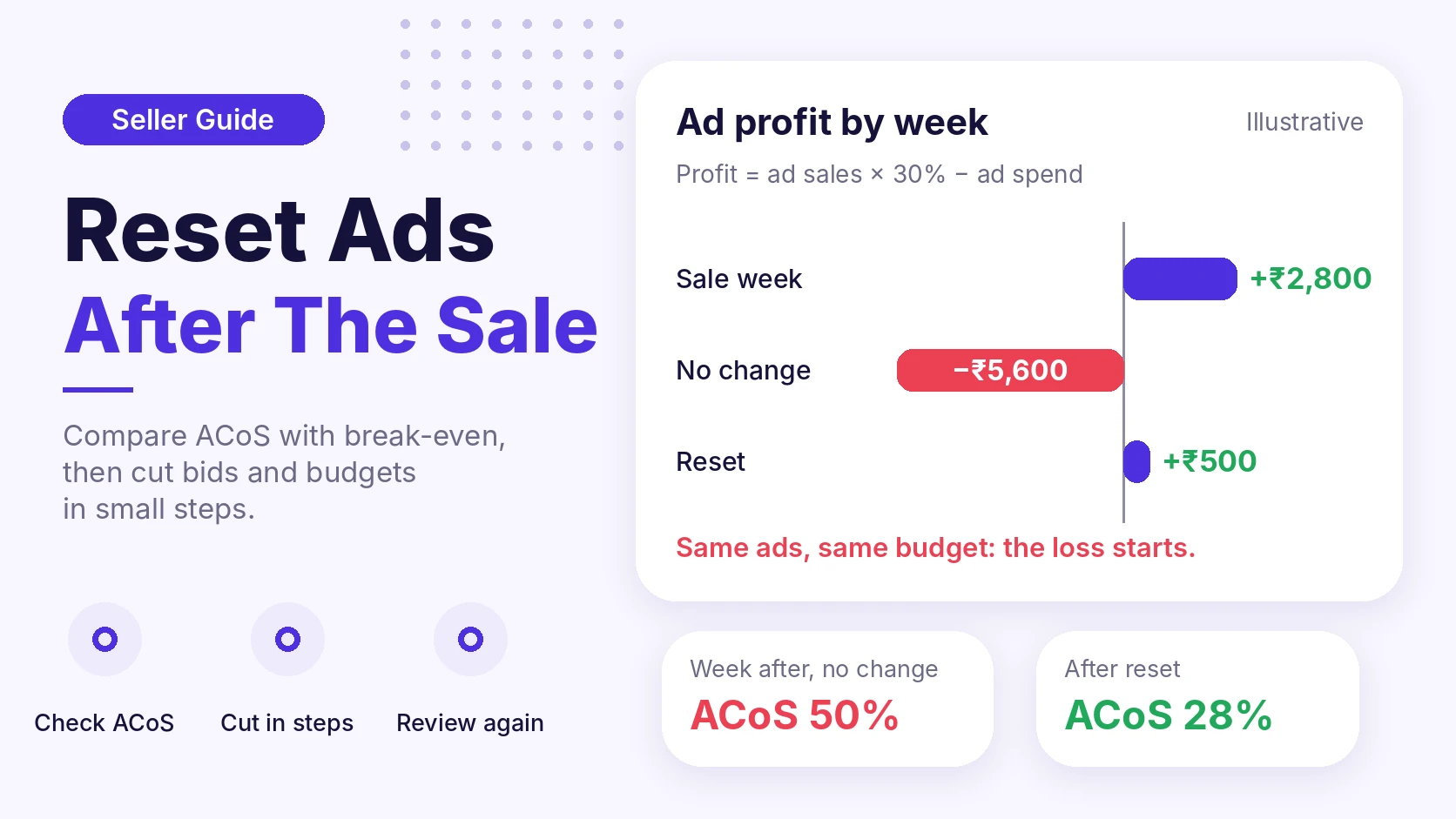
| Week after, no change | ₹14,000 | ₹28,000 | 50% |
| Week after, reset | ₹7,000 | ₹25,000 | 28% |
Now the profit from ads in each week:
- Sale week: ₹56,000 × 30% − ₹14,000 = ₹16,800 − ₹14,000 = ₹2,800 profit
- Week after, no change: ₹28,000 × 30% − ₹14,000 = ₹8,400 − ₹14,000 = −₹5,600 loss
- Week after, reset: ₹25,000 × 30% − ₹7,000 = ₹7,500 − ₹7,000 = ₹500 profit
The reset gave up ₹3,000 of ad sales. It also improved your ad profit by ₹6,100 compared with no change. The ad spend, not the sales number, made the difference.
What is a simple after-sale checklist?
Copy this list for your next sale.
- Before the sale: write down your normal budget and bid for each hero product.
- During the sale: log each change with the date.
- Day 1 after: check stock, ACoS and rule end dates.
- Day 2 after: reduce budgets in one step.
- Day 3 after: lower bids on campaigns above break-even ACoS.
- Day 7 after: compare ACoS and TACoS with your normal week. TACoS (total advertising cost of sales) is ad spend divided by total sales, including organic sales.
When should you NOT cut ads fast?
Cutting is not always right.
- Your product is still in demand. If sales and ACoS stay healthy, keep the settings.
- Another big sale is close. If a new event is near, a full reset and rebuild costs time. Check dates in Seller Central.
- You launched a product during the sale. New products need time to collect data. Do not judge them on the first days.
- Ads help your ranking on a key product. Cut slowly and watch your organic sales.
- Stock is high and you want to sell it. Cutting ads can slow your stock down. Check your days of cover first.
What about leftover stock and returns?
A sale can leave you with the wrong stock. Some products sell out. Others stay on the shelf. Use days of cover (units in stock ÷ units sold per day) to decide. For slow stock, read how to clear slow-moving inventory safely.
Returns from sale orders can also arrive in the weeks after the sale. Watch return reasons before you plan the next sale. Our guide on why returns increase shows how.
How eComSuite helps
Doing this by hand is slow when you manage many campaigns. eComSuite offers these modules, as described on the tools page:
- Ad Optimizer has rule-based bid optimization, daily budget automation and automatic rule scheduling. You set a rule once, and it runs on the schedule you choose. It also has an activity log of changes.
- Ad Pulse gives real-time campaign data, so you can see spend as it happens.
- eComACT finds high-converting hours and shows spend in hours that did not convert.
- Inventory Management has inventory forecasting to help you plan stock.
These tools help you see and apply changes faster. You still decide the rules.
Frequently asked questions
Should I stop all ads after a festive sale?
No. Stopping all ads can cut your organic sales and ranking. Reduce spend on weak campaigns first. Keep the profitable ones.
How long should I wait before I change bids again?
Wait a few days so the data can settle, then review. Orders can be reported after the click, so the first day can look worse than it is.
Will my ACoS go back to normal by itself?
Not always. It depends on demand, price, stock and your settings. Check your own data, and do not wait for it to fix itself.
Takeaway
A festive sale ends, but your ad settings do not. Check your break-even ACoS, return budgets to normal in small steps, and lower bids on weak campaigns. Then review again after a few days.
Want to see which campaigns spend most after your sale? Try eComSuite.
Sign Up - Free