


- By Admin
-
 Advertising
-
 16 October, 2026
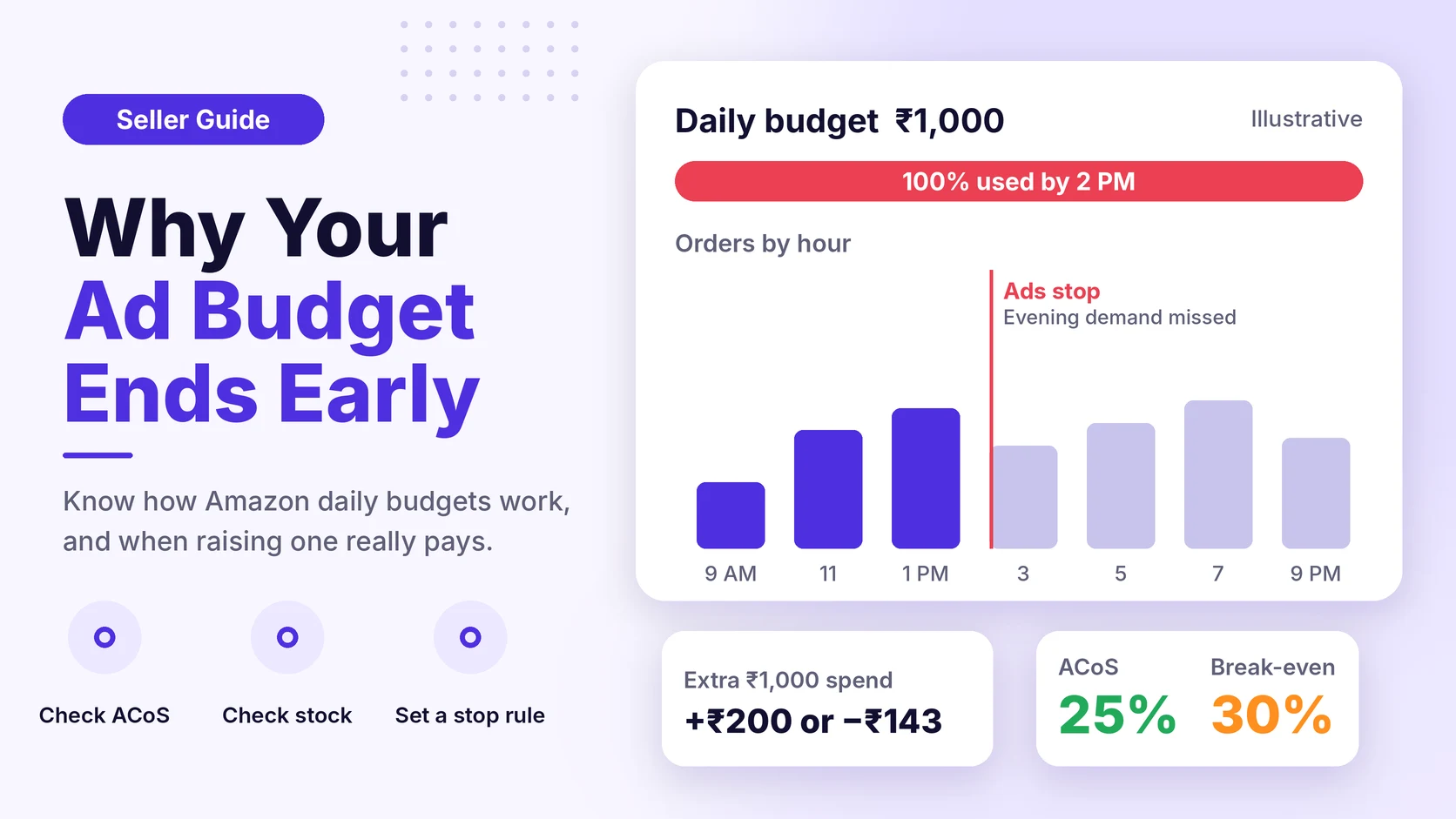
It is 2 p.m. on a festive sale day. Orders were strong in the morning. Then your best campaign goes quiet. The daily budget is finished, and the evening shoppers see your rivals, not you.
Many sellers find this out the next day, in the report. This guide explains how the Amazon ads daily budget really works, why it runs out early, and how to decide if you should raise it.
Key takeaways
- Amazon averages your daily budget over a month. One day can spend more, and another day can spend less.
- A budget that ends at noon is not always a problem. Check your ACoS and your stock first.
- Raise a budget only when the extra spend still stays below your break-even ACoS.
- Set your budget rules before a sale starts, not during it.
How does the Amazon ads daily budget work?
The daily budget is the amount you are happy to spend on a campaign each day. It is a target, not a hard wall.
Amazon's announcement on its daily budgeting policy says this for Sponsored Products, Sponsored Brands and Sponsored Display:
- A campaign can spend up to 100% more than the average daily budget on any given day.
- The daily budget is averaged over the course of a month.
- Money not spent on slow days can be used on busy days.
- You can set the extra spend from leftover amounts to 25% or 100%, in your settings.
Here is what that means in rupees. Your daily budget is ₹1,000. On one day the campaign may spend up to ₹2,000. In a 30-day month, think of it as about ₹30,000 in total.
Amazon may change these rules. Check your Ads console or Seller Central for the current policy before you change any setting.
Why does my Amazon ad budget run out early?
A budget that ends early is a signal. It tells you demand is higher than your budget, or that your campaign is spending on the wrong things.
These are the common causes:
| Cause | What you see | First action |
| High demand | Many orders, budget gone by noon | Check ACoS before you raise budget |
| Wasted clicks | Many clicks, few orders | Add negative keywords |
| High bids | Fast spend, high cost per click | Lower bids on weak terms |
| Too many ad groups | One budget shared by too many products | Split top sellers into their own campaign |
Look at the cause first. If you only raise the budget, a wasted-click problem becomes a bigger wasted-click problem.
For hour-by-hour patterns, read our guide on peak hour analysis for Amazon ads.
What does an early budget end really cost you?
Use a simple calculation. The numbers below are illustrative. They are not Amazon fees. Check your own fees in Seller Central.
Step 1. Find your break-even ACoS.
ACoS (advertising cost of sales) is ad spend divided by ad sales. Break-even ACoS is the highest ACoS at which an ad sale still does not lose money.
Formula: profit per unit before ads ÷ selling price
Calculation: ₹180 ÷ ₹600 = 30%
Step 2. Find your current ACoS.
Formula: ad spend ÷ ad sales
Calculation: ₹1,000 ÷ ₹4,000 = 25%
Your ads run at 25%. That is 5 points below break-even. You earn a small profit on each ad sale.
Step 3. Check what a higher budget earns.
On a festive day, you raise the budget from ₹1,000 to ₹2,000. Case A: the extra ₹1,000 brings the same 25% ACoS.
Formula: extra profit = extra ad sales × profit margin before ads − extra spend
Calculation: ₹4,000 × 30% − ₹1,000 = ₹1,200 − ₹1,000 = ₹200 profit
Case B: late-day clicks convert worse, and the extra ₹1,000 gives only ₹2,857 in sales (35% ACoS).
Calculation: ₹2,857 × 30% − ₹1,000 = ₹857 − ₹1,000 = −₹143 loss
The same extra budget can earn money or lose money. It depends on the ACoS of the extra spend, not your average ACoS. This is why you should not raise budgets by habit.
Should you raise the budget? A simple test
Ask three questions in this order.
- Is my ACoS below break-even? If not, fix the campaign first.
- Do I have enough stock? Extra ads create extra orders. Check your days of cover, which is units in stock divided by units sold per day. Our guide on advertising without creating stockout risk explains this.
- Is the extra demand real? Look at the hours when the budget ended. If orders in those hours were strong in past weeks, more budget may help.
If the answer to all three is yes, raise the budget in small steps. A rise of 20 to 30 percent is easier to judge than a jump of 100 percent.
A step-by-step budget check for sale weeks
Do this before a big sale. It takes about 30 minutes.
- List your hero products. These are your top sellers.
- For each one, write down the selling price, profit before ads and break-even ACoS.
- Check your stock cover. Note any product with less than 15 days of cover.
- Open your campaigns and note the ones that ran out of budget in the last 7 days. Note the hour.
- For each of them, check the ACoS. Mark the ones under break-even.
- Pick a budget for each marked campaign. Raise it in small steps.
- Write down a stop rule. For example: "If ACoS goes above break-even for two days, return to the old budget."
- Check results every day during the sale. Do not wait for the weekly report.
Amazon sets different rules for each event. For dates, deadlines and event rules, check Seller Central. Our Amazon Freedom Sale prep guide shows a planning method that works for any big sale.
When should you NOT raise the budget?
More budget is not always the answer.
- When your stock is low. Ads without stock waste money and can hurt your ranking.
- When ACoS is already above break-even. A bigger budget gives you more of the same loss.
- When one search term takes most of the spend. Check your search term report first.
- When you lose the Buy Box. Shoppers click, but the sale goes to another seller. Read how losing the Buy Box drains ad spend.
- When the data is too new. A new campaign can look weak at first. See why new campaign ROAS can mislead you.
A budget that ends early on a profitable campaign is a good problem. A budget that ends early on a campaign with poor ACoS is a leak.
How eComSuite helps
Doing this by hand means checking many campaigns many times a day. eComSuite offers these modules, as described on the tools page:
- Ad Optimizer has daily budget automation. You can raise the budget on sale days and lower it on slow days, and you can set rules for weekdays, weekends or festival periods.
- Ad Pulse shows hourly campaign data, so you can see when your spend happens and which campaigns drain budget.
- eComACT finds high-converting hours and shows spend in hours that did not convert. You can set schedules by day and hour.
These tools help you see the problem early. The decision to raise, hold or cut a budget is still yours.
Frequently asked questions
Does Amazon stop my ads when the daily budget ends?
When a campaign has used its budget, it stops showing ads for the rest of the day. Because Amazon averages the budget over a month, a campaign may spend more on some days. Check your Ads console for the current status.
Can my campaign spend more than the daily budget?
Yes. Amazon says a campaign can spend up to 100% more than the average daily budget on a given day. Over the month, the budget is averaged.
What is the best daily budget for an Amazon campaign?
There is no single number. Start from your break-even ACoS, your sales per day and your stock cover. Then adjust in small steps.
Should I raise budgets for Diwali and other sales?
Only for campaigns that are profitable and have stock. Set your stop rule before the sale starts.
Takeaway
A budget that ends early shows demand, but it does not tell you if more spend will pay. Check your break-even ACoS and your stock first. Then raise budgets in small steps, with a stop rule.
Want to see which campaigns run out of budget, and when? Try eComSuite.
Sign Up - Free