


- By Admin
-
 Data Insights
-
 23 October, 2026
Your rating dropped from 4.3 to 4.0 in two months. Sales are slowing, and ad costs are going up. You read a few bad reviews, fix one thing, and hope for the best.
Three weeks later, the same complaints are back. The problem was not a lack of reviews. The problem was that nobody counted them.
This guide shows a simple way to do Amazon customer review analysis: group complaints into themes, find the biggest one, and fix it first.
Key takeaways
- One angry review is a story. Twenty reviews with the same complaint are data.
- Group complaints into 4 to 6 themes, then count them. Fix the biggest theme first.
- Match reviews with returns. A theme that shows up in both costs you the most.
- Do not chase every complaint. Some feedback is about the wrong buyer, not a bad product.
Why does Amazon customer review analysis matter?
Reviews are the only place where buyers tell you, in their own words, why they are unhappy. Reports show you what happened. Reviews show you why.
Low ratings can also hurt you in three ways:
- Fewer shoppers click on your listing.
- Fewer clicks turn into orders.
- Your ad money buys less, because the same click converts at a lower rate.
Many sellers read reviews one by one. That feels useful, but it is slow. It also makes you react to the loudest review, not the most common one.
What should you look for in reviews?
Do not read for feelings. Read for themes. A theme is one repeated cause of complaint.
These are common themes for physical products:
| Theme | Example words | Usual fix |
| Size or fit | "too small", "tight" | Size chart, listing text |
| Quality | "broke", "stopped working" | Supplier check |
| Not as shown | "colour is different" | Photos, title, bullets |
| Packaging | "arrived damaged" | Better pack, new carton |
| Missing items | "no charger in the box" | Listing text, packing check |
Your own product will have its own themes. Start with the table, then add or rename themes as you read.
Also note the good themes. Positive reviews tell you what to put in your title, images and bullets.
How do you group and count reviews? A simple 5-step method
You can do this with a spreadsheet for one product. It takes about an hour.
- Pick one ASIN (Amazon Standard Identification Number, the product ID). Start with your biggest seller or the one with the lowest rating.
- Pick a time window. Use the last 60 to 90 days. Old reviews may describe a product you no longer sell.
- Collect the 1-star to 3-star reviews. Copy the text into a sheet, one review per row.
- Give each review one main theme. If a review has two problems, use the first one it states.
- Count and rank. Work out the share for each theme.
Use this formula:
Theme share = reviews in the theme ÷ total negative reviews × 100
Do not guess the theme from the title of the review. Titles are short and often unclear. Read the full text.
Worked example: what is one complaint theme costing you?
This example is illustrative. The numbers are made up to show the method. Use your own data.
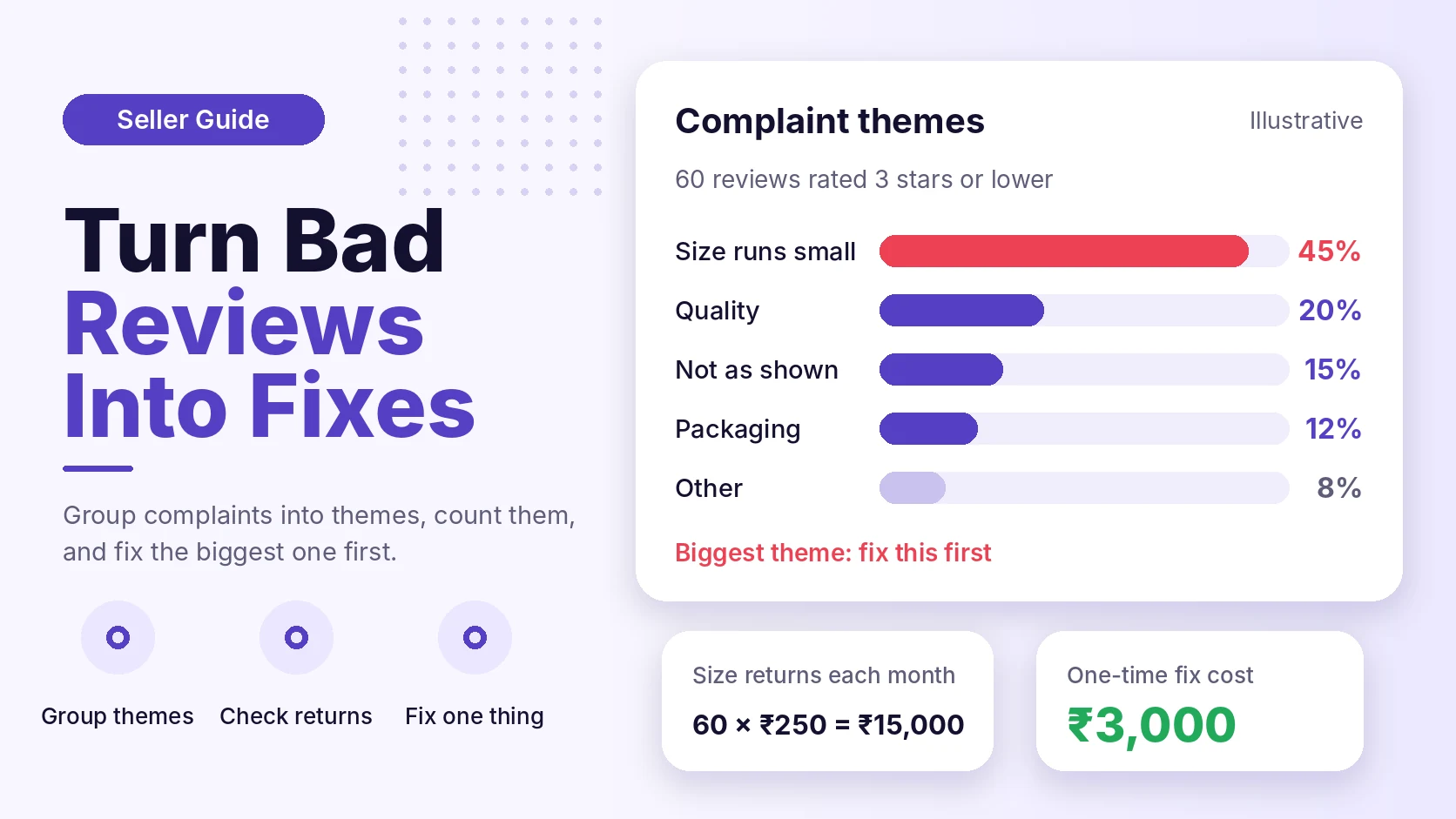
A seller sells a kurta set. In the last 90 days, it got 60 reviews of 3 stars or lower.
Step 1: find the biggest theme.
Theme share = 27 ÷ 60 × 100 = 45%
The theme is "size runs small". It is the biggest group. The next theme has 12 reviews, which is 20%.
Step 2: estimate what the theme costs.
Assume these numbers:
- Orders per month: 1,000
- Returns caused by size: 6% of orders, which is 60 returns
- Cost per return (pickup, handling and units that cannot be resold): ₹250
Monthly cost = 60 returns × ₹250 = ₹15,000
Step 3: compare it with the fix.
Assume a new size chart image and a listing update costs ₹3,000 once. If it cuts size returns by half:
Monthly saving = ₹15,000 × 50% = ₹7,500
Payback = ₹3,000 ÷ ₹7,500 = 0.4 months
The fix pays back in less than a month in this example. Your result may be different. A fix may cut returns by less than half, or not at all. Treat the number as a test, then check it after 30 days.
How do reviews connect to returns?
A review is one signal. A return is another. When both point to the same cause, the cause is real.
In the example above, check the return reasons for the same ASIN. If "too small" shows up there too, you have a strong case.
Our guide to Amazon return analytics explains how to read return patterns by SKU (stock keeping unit, your own product code).
If a theme appears in reviews but not in returns, ask why. Buyers may complain but keep the product. That is a lower priority.
When should you NOT act on a review theme?
Not every complaint needs a product change. Check these before you spend money.
- Wrong-buyer complaints. "Too expensive" or "not for kids" may mean your listing attracts the wrong shopper. Fix the listing, not the product.
- Very small samples. Three reviews out of 60 is a weak signal. Wait for more data.
- Delivery complaints. If the complaint is about courier delay and not your product, read it as an operations issue. It may not belong in your product fix list.
- Contradicting reviews. If half the buyers say "too small" and half say "too large", the fix may be a better size chart, not a new size.
A fix also has a cost. Changing a supplier or a design can add risk. Test with a small batch first.
A checklist you can use this week
- Pick one ASIN with the lowest rating.
- Copy its 1-star to 3-star reviews from the last 90 days.
- Give each review one theme.
- Count the reviews in each theme and work out the share.
- Check the same ASIN's return reasons for the top theme.
- Choose one fix. Write down the date and the cost.
- Check reviews and returns again after 30 days.
Review rules matter too. Never offer money, gifts or refunds in return for a review, and never ask buyers for only positive feedback. Amazon sets the rules for review requests and messages. Check Seller Central for the current policy before you contact buyers.
How eComSuite helps
Counting reviews by hand works for one product. It is hard to keep up when you have many ASINs, or when you manage several accounts for clients.
These eComSuite modules cover the steps in this guide:
- Customer Sentiment Analysis turns review text into clear insights at product level. It also sends alerts when negative trends appear.
- Return Analytics shows return patterns by product, so you can compare them with your review themes.
- SKU Unit Economics shows sales, fees, ad spend and costs in one view, so you can judge what a fix is worth.
The tools help you see the pattern sooner. You still decide what to fix.
Frequently asked questions
How many reviews do I need before I trust a theme?
There is no fixed number. A larger sample is safer. As a rule of thumb, wait until a theme has appeared in several reviews over a few weeks before you change the product.
Can I remove a negative review?
Amazon decides which reviews to remove, and only when they break its rules. Check the current review policy in Seller Central. The better path is to fix the cause.
Should I reply to buyers who leave bad reviews?
Follow Amazon's current messaging rules. Do not ask the buyer to change or remove a review. Use the feedback to improve the listing or the product.
How often should I do review analysis?
Once a month is a good start for your top products. Check sooner after a launch, a supplier change or a sudden drop in rating.
Takeaway
Low ratings tell you something is wrong. Review themes tell you what to fix first. Count your complaints, check them against returns, and change one thing at a time. Then measure again after 30 days.
Want to see review themes for each of your products without a spreadsheet? Try eComSuite.
Sign Up - Free